
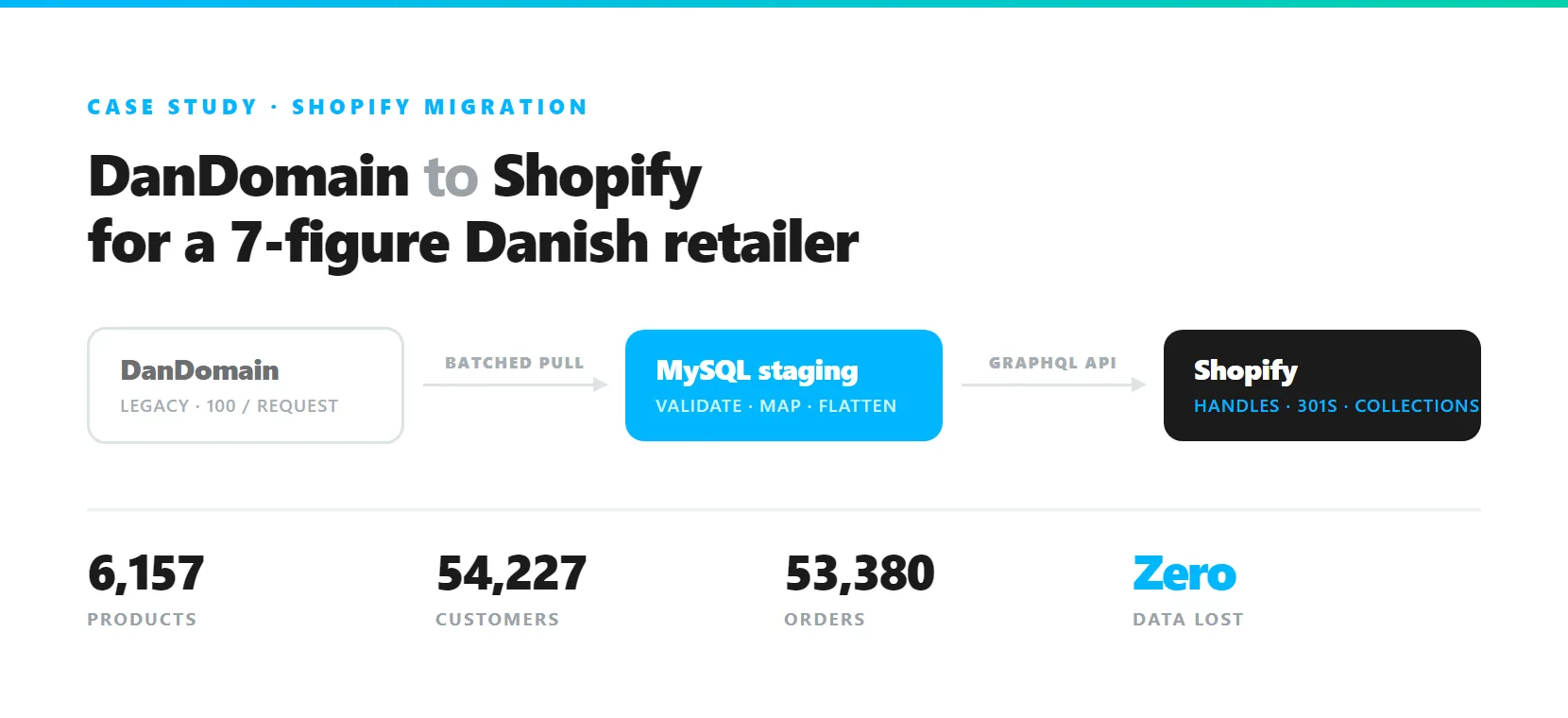
This DanDomain to Shopify migration moved a Danish retailer trading at seven figures, who ran their store on DanDomain with two physical shops alongside it. Because the DanDomain API returns a maximum of 100 records per request, the obvious approach of paging straight into Shopify would have run for days and left no clean way to tell what had landed if it failed halfway. Rather than move records live, we built a pagination layer that pulled all 6,157 products, 54,227 customers and 53,380 orders into a local MySQL database first, so every transformation could be validated and re-run before anything touched Shopify. The complication was Shopify’s flat collections: DanDomain nests categories, and two subcategories under different parents can share a name, so letting Shopify generate handles would have silently numbered the duplicates and broken the redirect map. We set every handle explicitly at creation. The store moved with zero data loss, and every legacy category path resolved through the 301 map at cutover.
Below are the five things that stood in the way of this DanDomain to Shopify migration, and what we did about each. The details are DanDomain to Shopify, but the shape of the problem is not unique to either.
At a Glance
- Products migrated: 6,157
- Customer accounts migrated: 54,227
- Order records migrated: 53,380
- Data loss: zero
- Orphaned URLs at cutover: none
The Client
A Danish retailer trading at seven figures, running an online store on DanDomain alongside two physical shops and a customer base built over years of trading. The store was slow and hard to customise, so they wanted onto Shopify without paying for it in lost data, lost customer relationships or lost search visibility. That is what made a careful DanDomain to Shopify migration worth the planning.
Challenge 1: The API Returns 100 Records at a Time
DanDomain caps every API response at 100 items. Against 6,157 products, 54,227 customers and 53,380 orders, that is a painfully restrictive ceiling. The naive approach, pulling a page and pushing it straight into Shopify, leaves you with a half-migrated store and no clear record of where it stopped the first time anything fails.
The workaround. Rather than fight the limit, we built a custom pagination layer that pulled every record in batches into a local MySQL database. Products, customers, orders and transaction history all landed there first.
That one decision changed the shape of the whole project. With the full dataset staged locally we could validate, reconcile and reformat everything before a single record touched Shopify, and re-run any transformation as many times as it took without re-hitting a rate-limited API. The slow, fragile part of the job happened exactly once.
Challenge 2: Collections Could Not Go Through the Product CSV
The catalogue itself imports cleanly as Shopify-ready CSVs, with variants, SKUs, pricing, media and metafields mapped. Collections are where the CSV route falls apart, for two separate reasons.
One collection per import. Most of this catalogue sat in several categories at once. With 6,157 products, honouring that through CSV meant re-running the entire file once for every extra collection a product belonged to. Six passes if the deepest product sat in six categories, each pass grinding through all 6,157 rows to update a fraction of them. Days of import time, no clean way to check what landed between runs, and any partial failure sending you back to the start.
No control over the handle. Importing by CSV creates collections by name alone. You do not get a say in the handle that results.
That handle is the URL. It had to be ours to control.
The workaround. We rebuilt the collection structure through the Shopify GraphQL Admin API instead, which lets you set the handle explicitly at creation and assign a product to as many collections as it belongs to in a single pass.
Challenge 3: Flattening the Category Tree Creates Silent Collisions
DanDomain nests categories several levels deep. Shopify has no nesting at all, so every one of those paths has to be flattened into a single collection. This is where the real danger sat, and it is the failure most likely to go unnoticed until it is expensive.
On DanDomain, two subcategories can share a name as long as they live under different parents, because the parent in the path keeps them apart. Take the parent away and they are simply two collections with the same name.
Had we let Shopify generate handles from titles, both would have wanted the same one, and Shopify would have quietly appended a number to the second. Nothing fails. Nothing warns you. And the redirect map you build afterwards now sends half those customers to the wrong page.
The workaround. We set every handle explicitly at creation, appending the parent name wherever two categories shared a title. The disambiguation is deliberate and recorded, rather than left to a silent counter.
Challenge 4: Every Legacy URL Still Had to Resolve
Flattening the tree means the old URL structure cannot carry across as it stood. For a store with years of accumulated search visibility, a redirect map that is merely close is not good enough. Every legacy category path has to land somewhere correct.
The workaround. Rather than trust the handles we thought we had set, we ran a bulk query back through the same GraphQL Admin API to pull every handle Shopify had actually saved. That verified list did two jobs. It drove the product-to-collection assignments, matched against the category relationships still sitting in MySQL, and it became the source data for the 301 redirect map. Because a product’s full set of categories was already staged, a product belonging to six collections landed in all six in one pass.
Challenge 5: 54,227 Customers Could Have Been Locked Out
Customer records are not the hard part. Credentials are. Passwords do not migrate between platforms, and an account that arrives without a way back into it is worse than no account at all, because the customer sees a login they cannot use sitting in front of their own purchase history.
The workaround. Customer accounts and complete order histories came across with contact details, payment records and fulfilment data intact, paired with secure password reset flows so all 54,227 customers could re-enter their accounts on first login.
The DanDomain to Shopify Migration Stack
- Languages: PHP, JavaScript
- APIs: DanDomain API, Shopify GraphQL Admin API, Shopify REST API
- Database: MySQL, for staging and transformation
- SEO: canonical URLs, 301 redirect mapping
Results of the DanDomain to Shopify Migration
- Zero data loss across products, customers and orders
- Every legacy category path resolved through the redirect map, with no orphaned URLs at cutover
- No duplicate or auto-numbered collection handles anywhere in the new structure
- All 54,227 customers retained access to their full order history
Conclusion
Every part of this DanDomain to Shopify migration came down to planning around a platform limit rather than fighting it. A staging database turned a rate-limited API into a one-time cost. Explicit handles turned a silent SEO failure into a controlled build. Reading the handles back turned an assumption into a verified redirect map. None of it is exotic. It is deciding where the risk sits before you start moving records, instead of finding out afterwards.
The rebuild leaned on the Shopify GraphQL Admin API throughout. The shorter project write-up sits in our portfolio as the 7-figure DanDomain to Shopify migration, and if you are weighing a replatform rather than a migration, the Shopify rebrand for Grassias covers that route instead.
Planning a migration off a legacy platform? Request a quote and we will map out the route.